
Outpainting (Image Expansion)
Outpainting generates new visual content beyond the original borders of an image, effectively expanding the frame. The AI assesses the source photo to continue existing lighting, perspective, color palettes, and textures naturally. It enables creators to adjust aspect ratios and rescue cramped compositions without cropping.
Also known as: outpainting, expand, Zoom Out, Pan, reframe, uncrop
Side-by-side test results
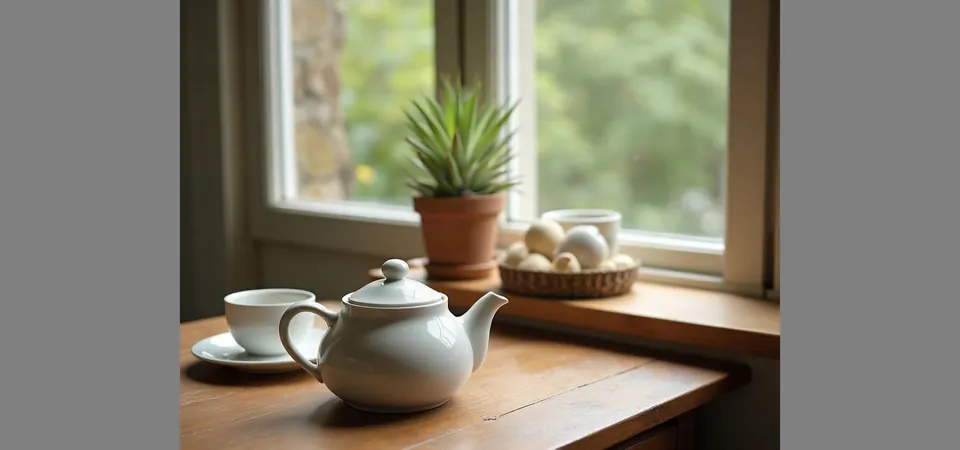
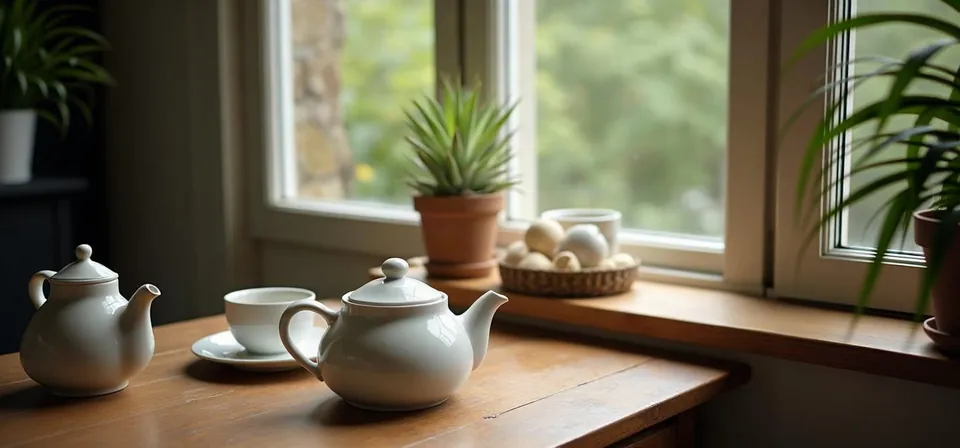
Model: FLUX.1 Fill [pro] (przez API fal.ai). Settings: 1024x768 image placed on a 1638x768 canvas, mask on empty side strips, seed 1411. Date: 14.11.2026.
Prompt: a ceramic teapot and two cups on a wooden table next to a window, soft morning light, still life photo, wider view of the room
I tested this by expanding a still-life image horizontally onto a wider canvas. The model drew the rest of the windowsill across both flanks, added a second pitcher, and rendered an adjoining section of the room. The seams were completely invisible and the light direction matched, though a few tiny details along the original edges shifted because the mask overlapped them by several pixels.
Syntax across generators
| Generator | Parameter | Values | Default |
|---|---|---|---|
| Midjourney* | Zoom Out / PanZoom Out poszerza na 4 strony, Pan w wybranym kierunku. Strony Pan/Zoom podają V6.1, tabela wersji - Edit Model w V8.1/V8.2 (sprzeczność w dokumentacji) | - | - |
| FLUX | FLUX.1 Expand [pro]: top, bottom, left, right | 0-2048 px each | 0; steps 50, guidance 60 |
| Ideogram | Reframe (ideogram-3: resolution; nano-banana-2: aspect_ratio)Preserves source pixels in center and outfills the rest | - | - |
| Imagen (retired) | editMode EDIT_MODE_OUTPAINTModel imagen-3.0-capability-001 marked as deprecated | dilation (fraction of width) - recommended 0.03; baseSteps start 35 | - |
| Stability AI (SD 3.5) | Outpaint: left, right, up, down + creativityAt least one direction > 0; preferably no more than source dimension. Creativity range contradiction in documentation | 0-2000 px each; creativity 0-1 (shared schema: 0.2-0.5) | 0; creativity 0.5 (shared schema: 0.35) |
| GPT Image | no dedicated parameter | - | - |
* Midjourney: docs.midjourney.com blocks automated scrapers, so values are sourced from search engine indexes. Please verify settings on the official Midjourney site before production use.
- Sources, verified on 14.11.2026:
- Midjourney: docs.midjourney.com/hc/en-us/articles/32570788043405-Pan
- FLUX: docs.bfl.ml/api-reference/models/expand-an-image-with-flux1...
- Ideogram: developer.ideogram.ai/openapi/ideogram-api-v2.json
- Imagen: docs.cloud.google.com/vertex-ai/generative-ai/docs/image/ed...
- Stability AI: docs.stability.ai/api-reference/edit/outpaint.md
- GPT Image: developers.openai.com/api/docs/guides/image-generation
When to use it
- Reformatting aspect ratios, such as turning a square photo into a 16:9 banner or a 9:16 mobile story without cropping the subject
- Adding clean negative space around a product shot to leave room for advertising copy or website navigation
- Fixing a cramped composition where a portrait clipped someone's elbow, hair, or surroundings
Common mistake
Expanding the canvas by multiple image widths in a single pass. When an engine tries to generate massive empty areas all at once, it frequently invents bizarre artifacts, distorted perspectives, or duplicate subjects. Expand incrementally instead, adding 25% to 50% at a time to keep the scene grounded.
Ready-to-use example
FLUX.1 Expand [pro]:  "top": 0, "bottom": 0, "left": 300, "right": 300
Stability (outpaint):  "left": 300, "right": 300
Midjourney:  Zoom Out 1.5x / Pan
Ideogram:  reframe to a new canvas size
Frequently asked questions
How do you turn a portrait photo into a landscape image with AI?
Place the vertical picture on a wider canvas and run an outpainting pass on the empty left and right sides. In Midjourney, use the Pan or Zoom Out buttons, while standalone tools and APIs let you define explicit pixel padding on each side.
What is the difference between inpainting and outpainting?
Inpainting edits pixels inside the current boundaries of your picture, such as erasing a stray coffee cup or changing an outfit. Outpainting works strictly outward from the edges, building new scenery outside the original crop.
Why did outpainting alter elements near the edge of my original photo?
Most outpainting tools require an overlap of roughly 8 to 16 pixels between the source image and the masked area to feather the seam. If vital details sit right against that edge, the generator will treat them as part of the generation zone and repaint them.
Does outpainting require a detailed text prompt?
Not always. Leaving the prompt blank or keeping the original description usually instructs the AI to continue the existing background naturally. Adding new prompt details is only necessary if you want specific objects, like a window or a doorway, placed in the expanded zone.