
Aspect Ratio
Aspect ratio defines the proportional relationship between an image's width and height, such as 16:9 for widescreen displays or 9:16 for mobile video. Rather than cropping a finished graphic, an AI image generator arranges the entire composition from scratch to fit the requested frame.
Also known as: aspect ratio, --ar, aspect_ratio, image dimensions
Side-by-side test results
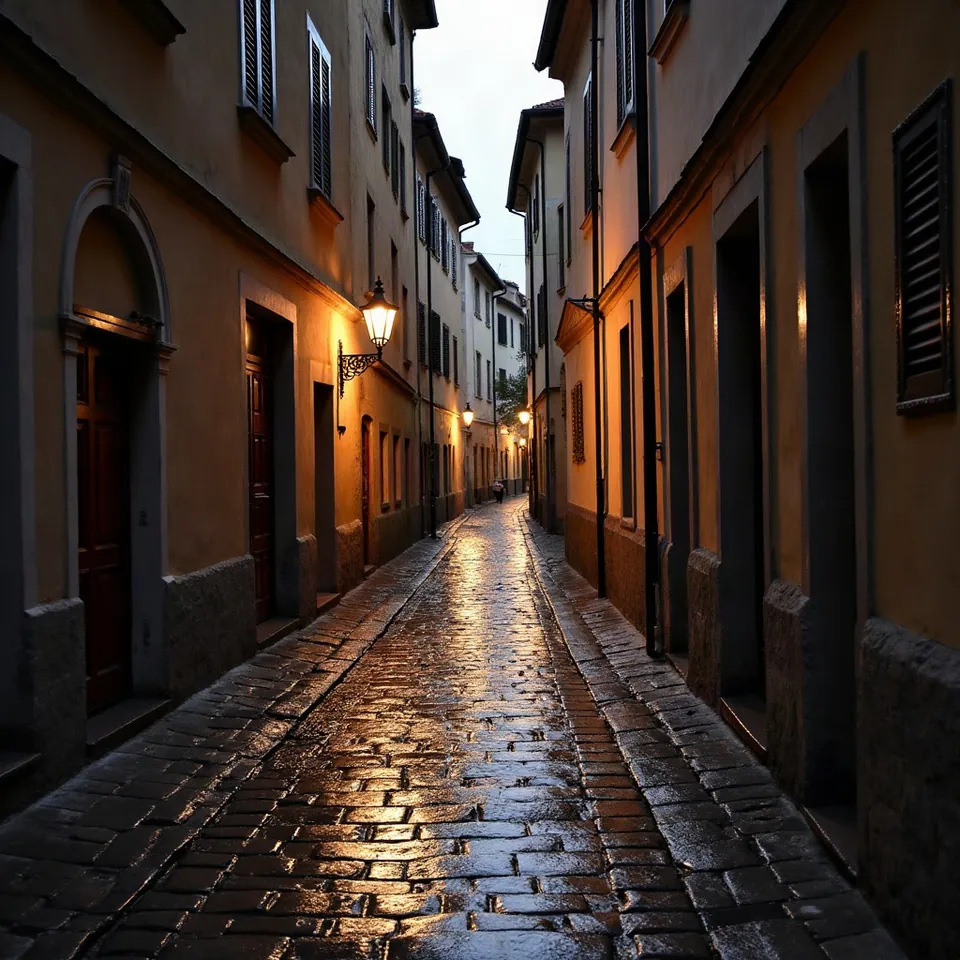
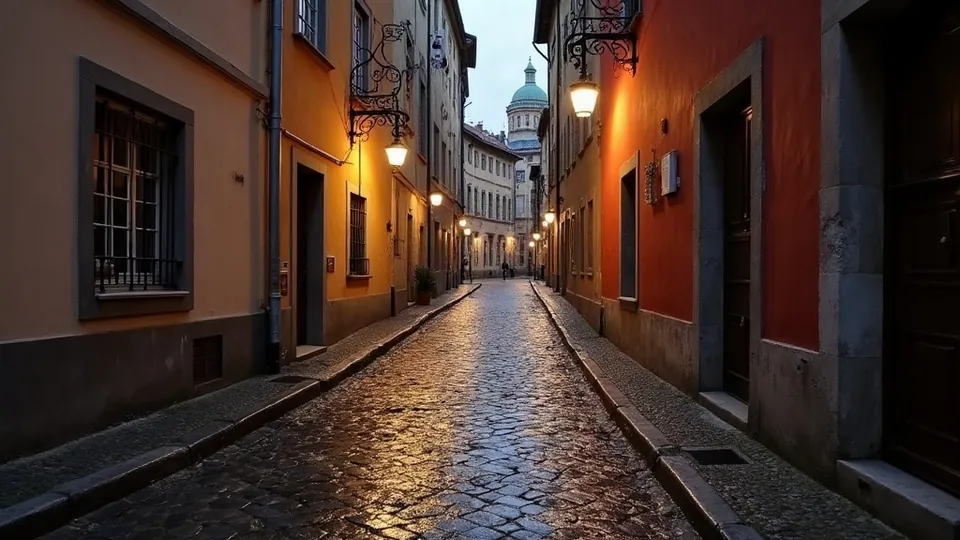
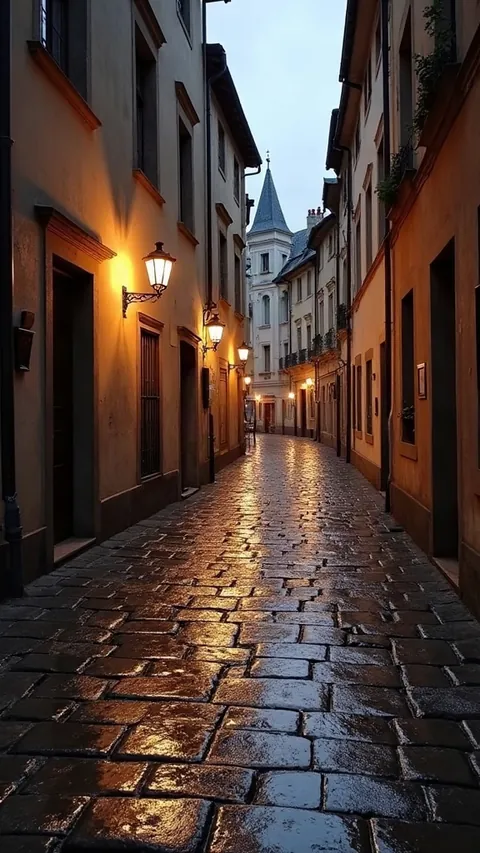
Model: FLUX.1 [dev] (otwarte wagi, przez API fal.ai). Settings: same seed 1411, 28 steps, guidance 3.5, only dimension changes. Date: 14.11.2026.
Prompt: a narrow cobblestone street in an old european town after rain, reflections on the stones, evening, photo
Using the same seed 1411, my three test renders generated three completely distinct compositions rather than simple crops of one scene. In the 9:16 portrait frame, the street gained vertical depth and felt narrower, while at 16:9, the model drew additional storefronts and sidewalks on both sides.
Syntax across generators
| Generator | Parameter | Values | Default |
|---|---|---|---|
| Midjourney* | --ar / --aspect | integers W:H (no decimals); V8.1/V8.2 max. 14:1 (4:1 for HD) | 1:1 |
| FLUX | aspect_ratio (FLUX 3)auto: aspect ratio from prompt, then from 1st reference image, otherwise 1:1. Ignored when width+height are set. FLUX1.1 Ultra: aspect_ratio from 21:9 to 9:21, defaults to 16:9. FLUX.2: no aspect_ratio, width/height only | 21:9, 2:1, 16:9, 3:2, 7:5, 4:3, 5:4, 1:1, 4:5, 3:4, 5:7, 2:3, 9:16, 1:2, 9:21, auto | auto |
| Ideogram | aspect_ratio (Ideogram 3.0) / size (Ideogram 4.5)Notation with 'x' (16x9), not with colon | 3.0: auto, 1x3, 3x1, 1x2, 2x1, 9x16, 16x9, 10x16, 16x10, 2x3, 3x2, 3x4, 4x3, 4x5, 5x4, 1x1. 4.5: no aspect_ratio - aspect ratio via size (max 6:1). 4.0 transparent: 18 values from 1x4 to 4x1 + auto | 3.0: 1x1 when omitted (not the same as auto); 4.5: from prompt |
| GPT Image | size (aspect ratio via WIDTHxHEIGHT)No separate aspect ratio parameter | from 1:3 to 3:1 | none in retrieved content |
| Seedream* | sizeDokumentacja: metody, rozdzielczości, zakresy pikseli i proporcji zależą od modelu | 5.0 pro/flash: aspect ratio set by prompt (size = resolution level); 5.0 lite/4.5/4.0: pixels can be specified | - |
| Imagen (retired) | aspectRatioImagen models deprecated (see generatory.imagen) | 1:1, 3:4, 4:3, 16:9, 9:16 | 1:1 |
| Qwen-Image | size (aspect ratio via width*height) | from 1:8 to 8:1 | model selects from prompt |
| Stability AI (SD 3.5) | aspect_ratioSD 3.5 text-to-image only; same in Ultra | 21:9, 16:9, 3:2, 5:4, 1:1, 4:5, 2:3, 9:16, 9:21 | 1:1 |
| ComfyUI | width / height (EmptyLatentImage)no separate aspect ratio parameter | aspect ratio is derived from latent dimensions | 1024x1024 |
* Midjourney: docs.midjourney.com blocks automated scrapers, so values are sourced from search engine indexes. Please verify settings on the official Midjourney site before production use.
- Sources, verified on 14.11.2026:
- Midjourney: docs.midjourney.com/hc/en-us/articles/31894244298125-Aspect...
- FLUX: docs.bfl.ml/api-reference/utility/generate-an-image-with-fl...
- Ideogram: developer.ideogram.ai/openapi/ideogram-api-v2.json
- GPT Image: developers.openai.com/api/docs/guides/image-generation
- Seedream: docs.byteplus.com/en/docs/ModelArk/1541523
- Imagen: docs.cloud.google.com/vertex-ai/generative-ai/docs/image/ge...
- Qwen-Image: www.alibabacloud.com/help/en/model-studio/qwen-image-genera...
- Stability AI: docs.stability.ai/api-reference/generate/stable-diffusion-3...
- ComfyUI: raw.githubusercontent.com/comfyanonymous/ComfyUI/master/nod...
When to use it
- Pick your ratio before running a prompt, since altering dimensions later forces the model to create a brand new composition.
- Choose 16:9 for YouTube video thumbnails, website header banners, and laptop wallpapers.
- Select 9:16 for vertical smartphone media such as TikTok clips, Instagram Reels, and mobile wallpapers.
- Use 4:5 or 1:1 for social feed posts, local business profile pictures, and online storefront thumbnails.
Common mistake
A frequent mistake is generating a square 1:1 canvas and manually cropping it to widescreen in an external editor. Doing so discards pixels, degrades sharpness, and often cuts off essential elements. Another issue is using the wrong syntax format, such as entering a colon ratio like 16:9 into an interface that expects an 'x' separator or raw pixel dimensions.
Ready-to-use example
Midjourney: street after rain --ar 9:16
FLUX / Stability: "aspect_ratio": "9:16"
Ideogram: "aspect_ratio": "9x16"
GPT Image: "size": "1024x1792" (pixel dimensions)
Qwen-Image: "size": "1024*1792"
Frequently asked questions
What aspect ratio should I use for TikTok and Instagram Reels?
Use 9:16. Enter this before generating so the model arranges the whole scene vertically with natural headroom and foreground space.
Why does Midjourney reject parameters like --ar 1.5:1?
Midjourney only accepts whole integers for aspect ratios. Use --ar 3:2 instead of decimal values to get the same 1.5:1 framing.
Does changing the aspect ratio crop the generated image?
No, generative models build the scene specifically for the chosen canvas shape. Changing the ratio generates a completely fresh composition rather than trimming the sides.
What happens if I omit the aspect ratio parameter?
Most image generators will default to a 1:1 square frame, which is ideal for avatars but requires outpainting if you later need a landscape banner.