
Image Resolution
Image resolution measures the total pixel dimensions of a generation, defined by its width multiplied by its height. In AI tools, you set it through exact pixel numbers or standard brackets like 1K, 2K, and 4K. Generating directly at higher resolutions demands significantly more processing power and time, dictating both rendering speed and the depth of fine detail.
Also known as: resolution, size, width/height, megapixels
Side-by-side test results
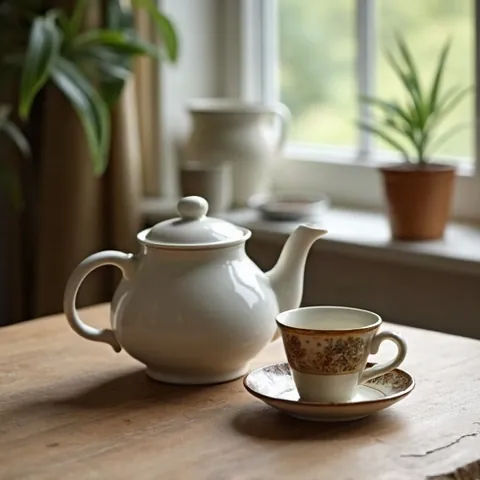
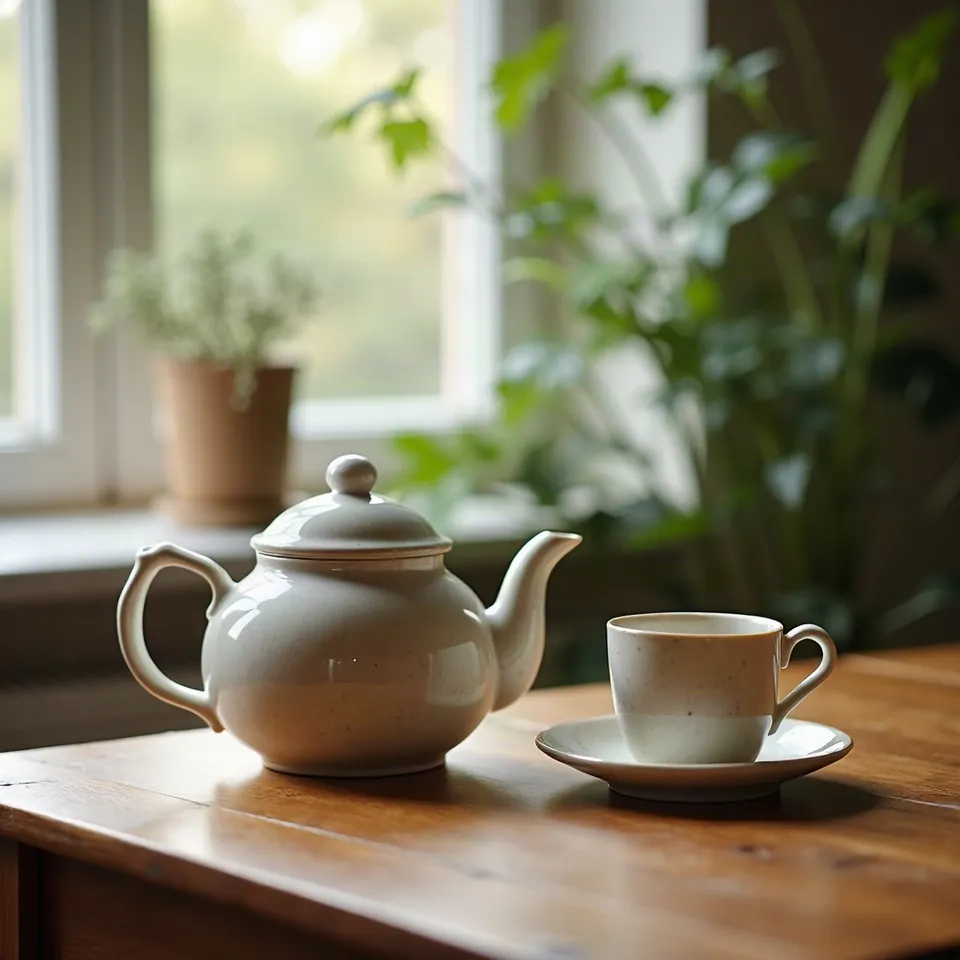
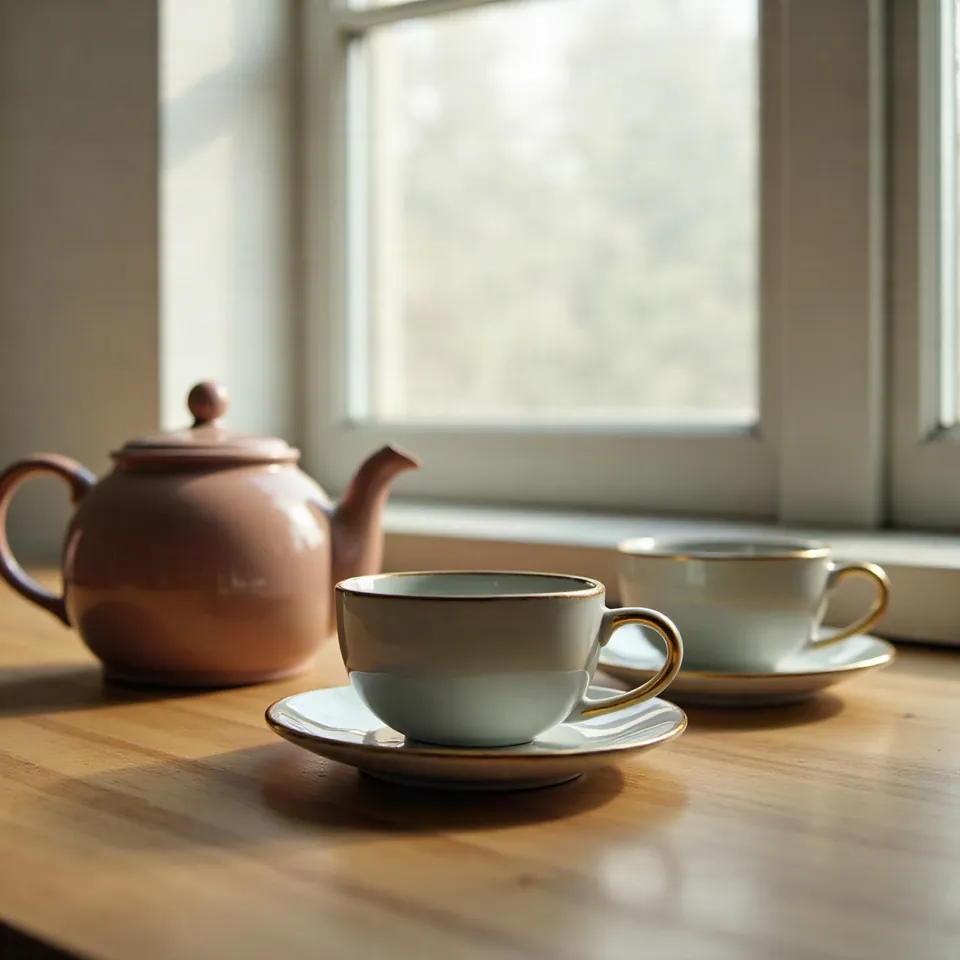
Model: FLUX.1 [dev] (otwarte wagi, przez API fal.ai). Settings: seed 1411, 28 steps, guidance 3.5, size is the only changed variable. Date: 14.11.2026.
Prompt: a ceramic teapot and two cups on a wooden table next to a window, soft morning light, still life photo
When I tested the exact same seed across different resolutions, the scene completely shifted: I got a different pitcher, a different houseplant, and an entirely new table layout. Resolution is not a simple sharpness slider; resizing the canvas alters the initial noise distribution, producing a fresh composition. At 512 px, the details remained noticeably soft, while jumping to 1536 px brought out crisp porcelain glaze and realistic wood grain.
Syntax across generators
| Generator | Parameter | Values | Default |
|---|---|---|---|
| FLUX | resolution / width + height (FLUX 3)width and height are provided together; they overwrite resolution and aspect_ratio. FLUX.2 pro/flex: width/height min. 64, no multiple or maximum specified | resolution: 768sq, 1k, 1.5k, 2k, 4k, match_input (edit only); width/height 256-6256 px; max. 16 822 272 px total (4 194 304 px with reference images) | 1k |
| Ideogram | size (4.5) / resolution (3.0, 4.0) | 4.5: auto, source or WIDTHxHEIGHT; sides multiples of 32, min 256 px, max 2048x2048 total, aspect ratio up to 6:1, without source images only presets 1K/2K. 3.0: ResolutionV3, 69 values (e.g. 1024x1024, 1344x704). 4.0: ResolutionV4, 38 values. 4.0 transparent: output_resolution 1k/2k/4k/8k (upscaled above 2k) | 4.5: auto with source images, otherwise according to prompt; 4.0 transparent: 1k |
| GPT Image | sizeApplies to gpt-image-2.6 Sunburst/Flare and gpt-image-2 | recommended 1024x1024, 1536x1024, 1024x1536; custom WIDTHxHEIGHT: multiples of 16, max. edge 3840 px, total 655 360 - 8 294 400 px; above 2560x1440 experimental | none in retrieved content |
| Seedream* | sizedokładne zakresy pikseli niepotwierdzone | 5.0 pro/flash: 1K, 1.5K, 2K; 5.0 lite: 2K, 3K, 4K or pixels; 4.5: 2K/4K or pixels; 4.0: 1K/2K/4K or pixels | 5.0 pro/flash: 2K; 5.0 lite: 2048x2048 |
| Imagen (retired) | sampleImageSizeUpscale: max output 17 MP | unconfirmed (not found on retrieved page) | - |
| Qwen-Image | sizeDashScope: 'width*height' (asterisk); OpenAI-compatible mode: 'widthxheight' and 'auto' | total from 512*512 to 2048*2048 px; any size in range | model selects based on prompt |
| ComfyUI | width / height (EmptyLatentImage) | 16-16384, step 8 | 1024 |
| Midjourney | no size parameter; HD mode mentioned with --arDraft V8.1/V8.2: 512x512. Upscale Subtle/Creative doubles size | - | - |
| Stability AI (SD 3.5) | none (fixed resolution) | SD 3.5 and Ultra: 1 MP; inpaint: 4 MP output | 1024x1024 |
* Midjourney: docs.midjourney.com blocks automated scrapers, so values are sourced from search engine indexes. Please verify settings on the official Midjourney site before production use.
- Sources, verified on 14.11.2026:
- FLUX: docs.bfl.ml/api-reference/utility/generate-an-image-with-fl...
- Ideogram: developer.ideogram.ai/v2/api-reference/images/generate/ideo...
- GPT Image: developers.openai.com/api/docs/guides/image-generation
- Seedream: docs.byteplus.com/en/docs/ModelArk/1541523
- Imagen: docs.cloud.google.com/vertex-ai/generative-ai/docs/image/ge...
- Qwen-Image: www.alibabacloud.com/help/en/model-studio/qwen-image-genera...
- ComfyUI: raw.githubusercontent.com/comfyanonymous/ComfyUI/master/nod...
- Midjourney: docs.midjourney.com/hc/en-us/articles/35577175650957-Draft-...
- Stability AI: docs.stability.ai/api-reference/generate/stable-diffusion-3...
When to use it
- Use lower resolutions for rapid concept exploration, storyboarding, or testing prompt keywords without burning generation credits.
- Choose higher native dimensions for final marketing assets, print artwork, or hero banners that require rich macro textures.
- Generate at a standard size and run the result through an AI upscaler whenever you want to enlarge an existing composition without re-rolling the scene.
Common mistake
The most common misconception is assuming that the same seed at a higher resolution will simply render the exact same picture with crisper lines. Because changing the pixel dimensions changes the dimensions of the initial noise grid, the model arranges a completely different composition. Another mistake is typing custom dimensions that are not divisible by 8 or 16, which breaks the latent pipeline on many modern architectures.
Ready-to-use example
FLUX / GPT Image: "resolution": "2k" or "size": "2048x1152"
ComfyUI: Empty Latent Image -> width: 1024, height: 1024
Midjourney: resolution is set by model mode; enlarge the result with the Upscale button
Frequently asked questions
Is AI 4K the same as true camera 4K?
It matches the technical pixel count of a 4K frame, but actual clarity depends on whether the underlying model can draw coherent micro-details. Always inspect your render at 100 percent scale on a monitor before relying on native high-resolution output for print.
Why do ultra-wide or unusual sizes generate duplicate bodies?
Base models are trained primarily on standard square and rectangular buckets. If you enter extreme width or height values, the model struggles to fill the extra canvas with a single subject and often repeats heads, limbs, or entire scenes across the frame.
Should I generate high resolution right away or upscale later?
Drafting at standard sizes like 1024x1024 is far faster and saves compute. Once you find a lighting setup and character pose that works, send the finished output to a dedicated upscaler rather than trying to regenerate it from scratch at a higher size.