
AI Text Rendering
AI text rendering is the ability of an image generator to draw legible, spelled-out words directly inside a scene, such as storefront signs, product packaging, or promotional posters. Most systems require enclosing the target words in quotation marks so the algorithm knows what to write versus what to depict. While rendering short phrases in common scripts is reliable, diacritics and complex character sets still pose a challenge across several platforms.
Also known as: text rendering, typography, text in quotes, typography generation
Side-by-side test results
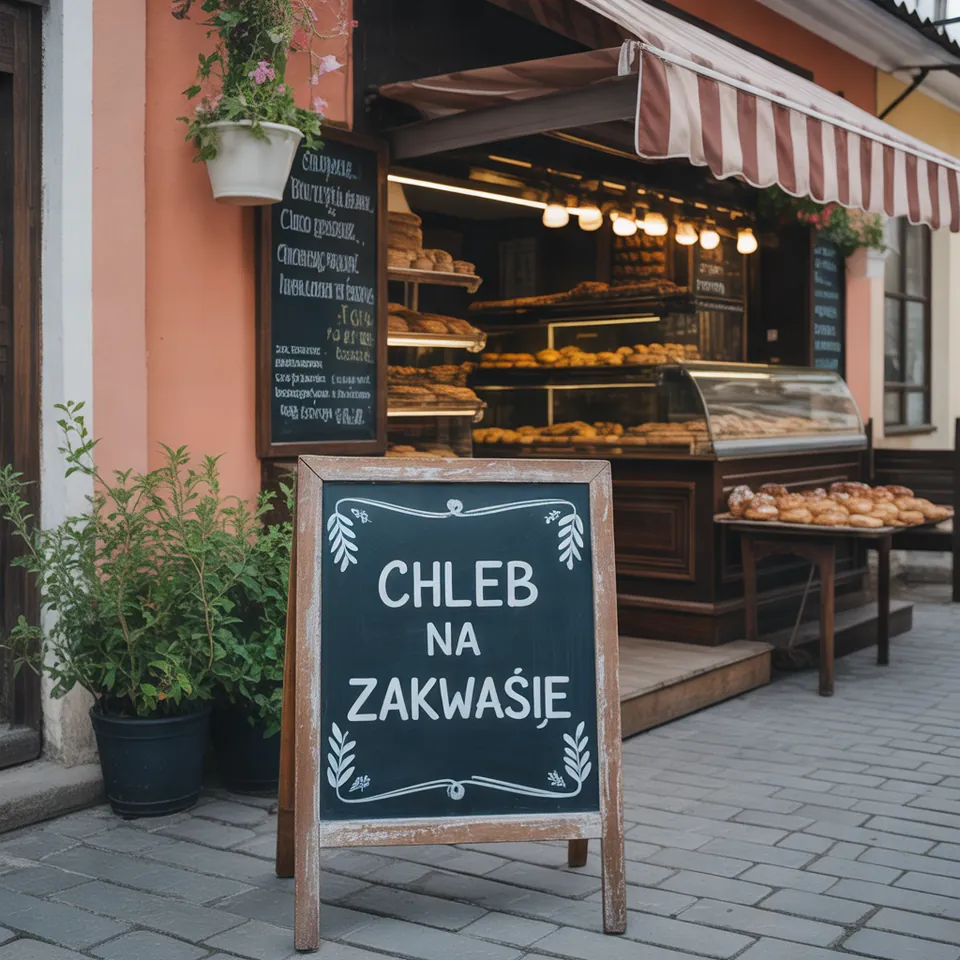
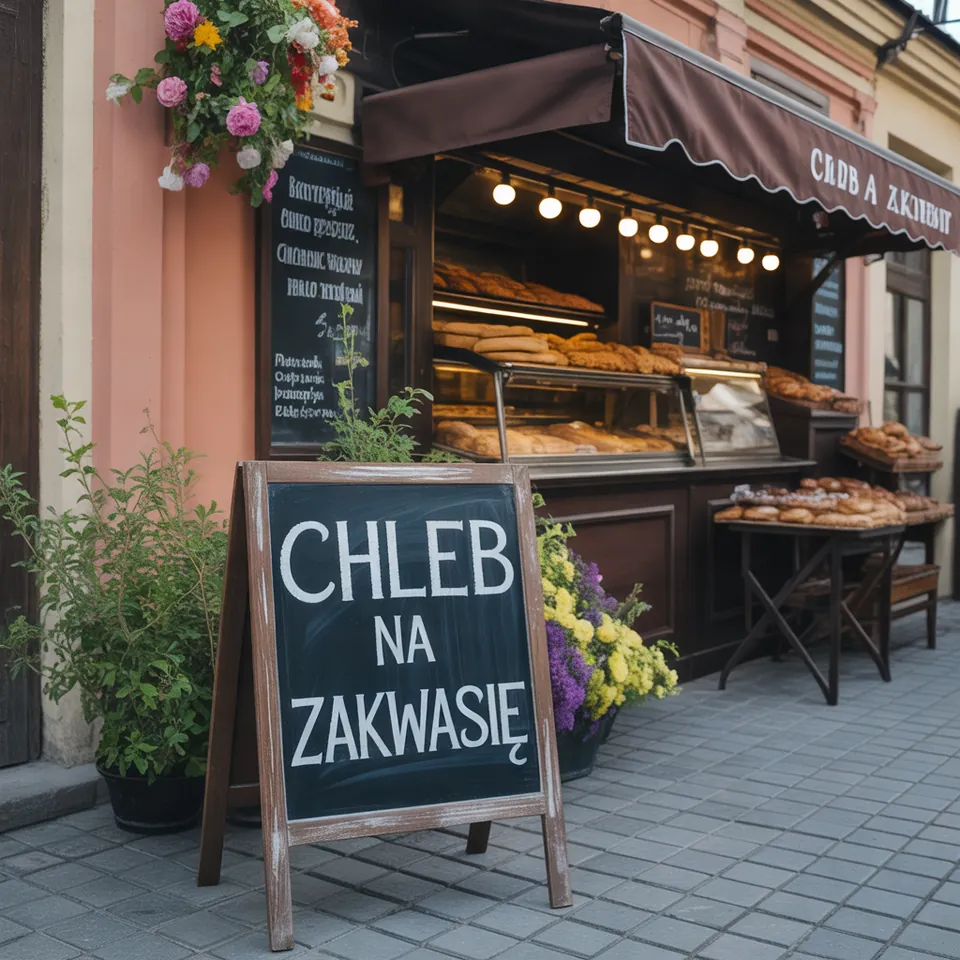
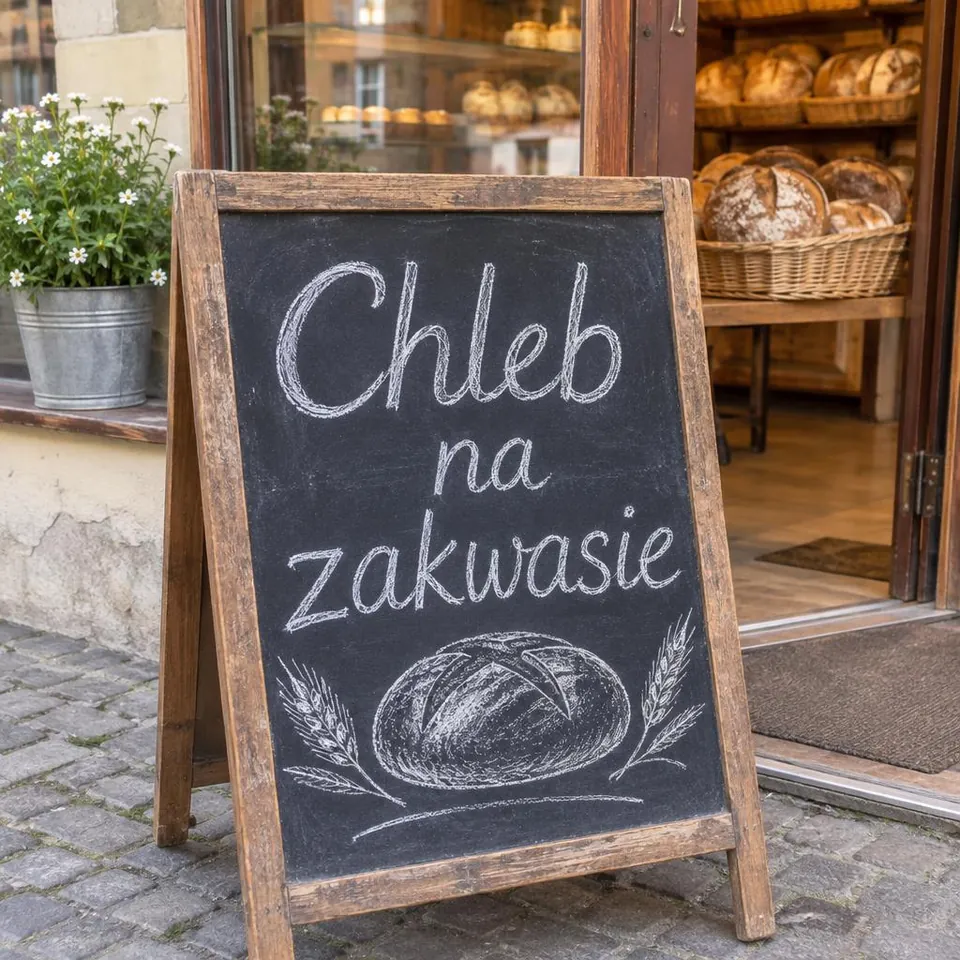
Model: Ideogram 3.0 (fal.ai, TURBO) i GPT Image 2.6 Flare (WaveSpeed, quality medium). Settings: Ideogram: seed 1411, once without quotes, once with quotes. Date: 14.11.2026.
Prompt: a chalkboard sign in front of a small bakery that says "Chleb na zakwasie", photo
Ideogram 3.0 stumbled on the diacritics in both test runs: one attempt rendered as ZAKWAŚIE and the other as ZAKWASIĘ. Enclosing the phrase in quotation marks did not fix the letter accents. GPT Image 2.6 Flare produced "Chleb na zakwasie" without a single flaw, styling it in natural chalkboard lettering. When you need text with special characters, picking the right model matters far more than any prompt tuning.
Syntax across generators
| Generator | Parameter | Values | Default |
|---|---|---|---|
| Midjourney* | text in double quotesTylko podwójny cudzysłów (pojedynczy/apostrof nie działa); najlepiej alfabet łaciński; przy problemach Raw lub niższy --stylize | - | - |
| FLUX | text in quotesEvery text in quotes with target capitalization and punctuation; specify placement, typeface (weight, color, style, e.g. 'like Helvetica'); check every text in the result | - | - |
| Ideogram* | text in quotes, near the beginning of the prompt; prompt JSON (4.0/4.5)W 4.0/4.5 każdy element tekstu w JSON może mieć text, desc, color_palette, bbox | - | - |
| GPT Image | complexity (gpt-image-2.6)Higher complexity helps with dense text and layouts; limitation: precise text placement can still be challenging | low, medium, high | high |
* Midjourney: docs.midjourney.com blocks automated scrapers, so values are sourced from search engine indexes. Please verify settings on the official Midjourney site before production use.
- Sources, verified on 14.11.2026:
- Midjourney: docs.midjourney.com/hc/en-us/articles/32502277092109-Text-G...
- FLUX: docs.bfl.ml/guides/prompting_unified_style.md
- Ideogram: docs.ideogram.ai/prompting/text-in-images
- GPT Image: developers.openai.com/api/docs/guides/image-generation
When to use it
- Event posters, book covers, YouTube thumbnails, labels, and product package mockups
- Short phrases: one to five words succeed far more reliably than full sentences
- Street scenes requiring authentic signage, such as a bakery board in Manchester or a diner window in Chicago
Common mistake
Attempting to generate long paragraphs or tiny fine print is the most common pitfall, as models quickly lose character cohesion over extended sentences. Another frequent error is leaving out quotation marks, which causes the engine to confuse your intended words with the descriptive elements of the prompt. Always inspect every single rendered letter manually before using an asset, since minor typos can easily slip past a quick glance.
Ready-to-use example
FLUX, Ideogram, GPT Image: chalkboard outside a bakery with the text "Sourdough Bread"
Midjourney (double quotes only): vintage poster with the words "SALE" --ar 4:5
Ideogram: short text in quotes, DESIGN style type for graphic layouts
Frequently asked questions
Why are double quotes essential when requesting text in AI images?
Quotation marks establish a clear boundary between the visual description and the exact characters you want drawn. Without quotes, the generator might interpret the text as an instruction for the scene rather than lettering on an object.
Can AI generators handle accent marks and foreign alphabets?
Support varies widely between architectures. While English and basic Latin scripts work smoothly on modern models, special accents and non-Latin alphabets often result in misplaced marks or distorted letters.
What should I do if a model repeatedly misspells my text?
Shorten the copy, describe the text placement explicitly, or generate the background visual in the tool and overlay clean typography using standard design software instead.