
Generation Speed Modes (Fast, Relax, Turbo)
Generation speed modes let you balance processing time and GPU quotas against image fidelity. Fast and draft settings produce lightweight concepts in seconds, while standard or quality modes take longer to build out intricate textures and coherent lighting. Depending on the platform, these controls appear as prompt flags, quality parameters, or background queue toggles.
Also known as: rendering_speed, TURBO, QUALITY, --draft, --fast, --relax, --turbo, speed modes
Side-by-side test results
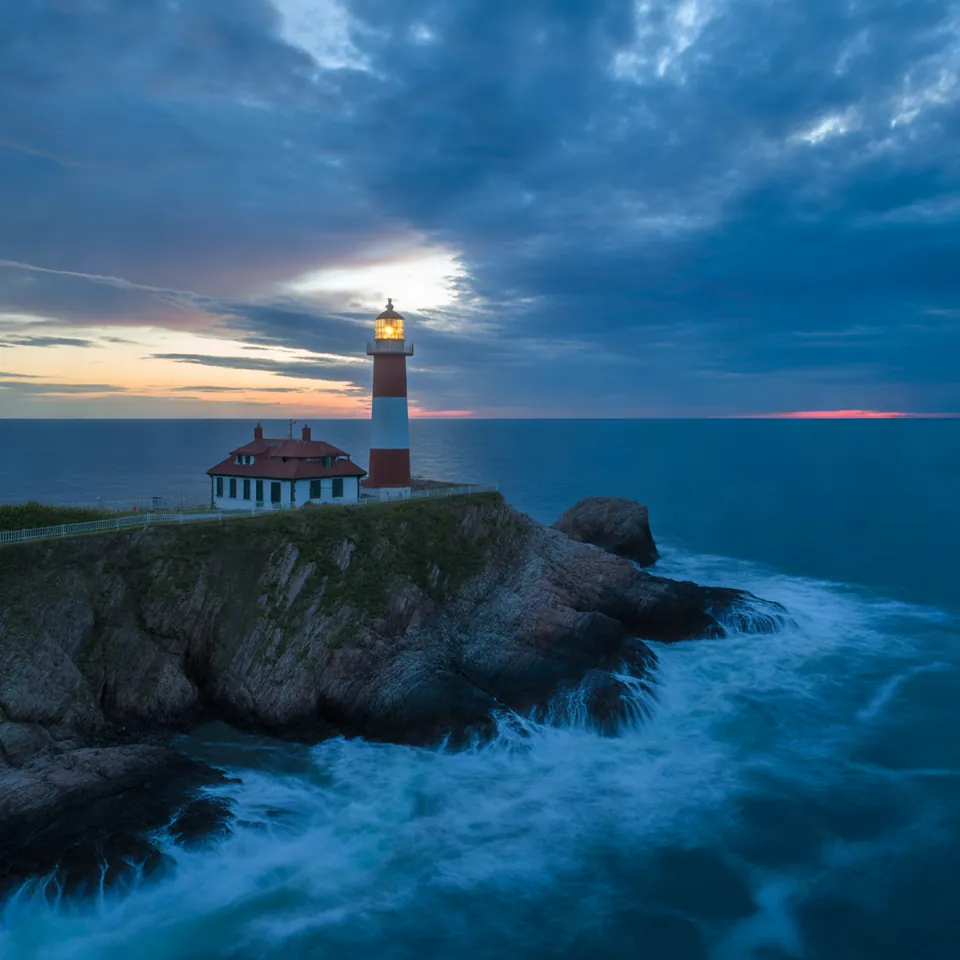
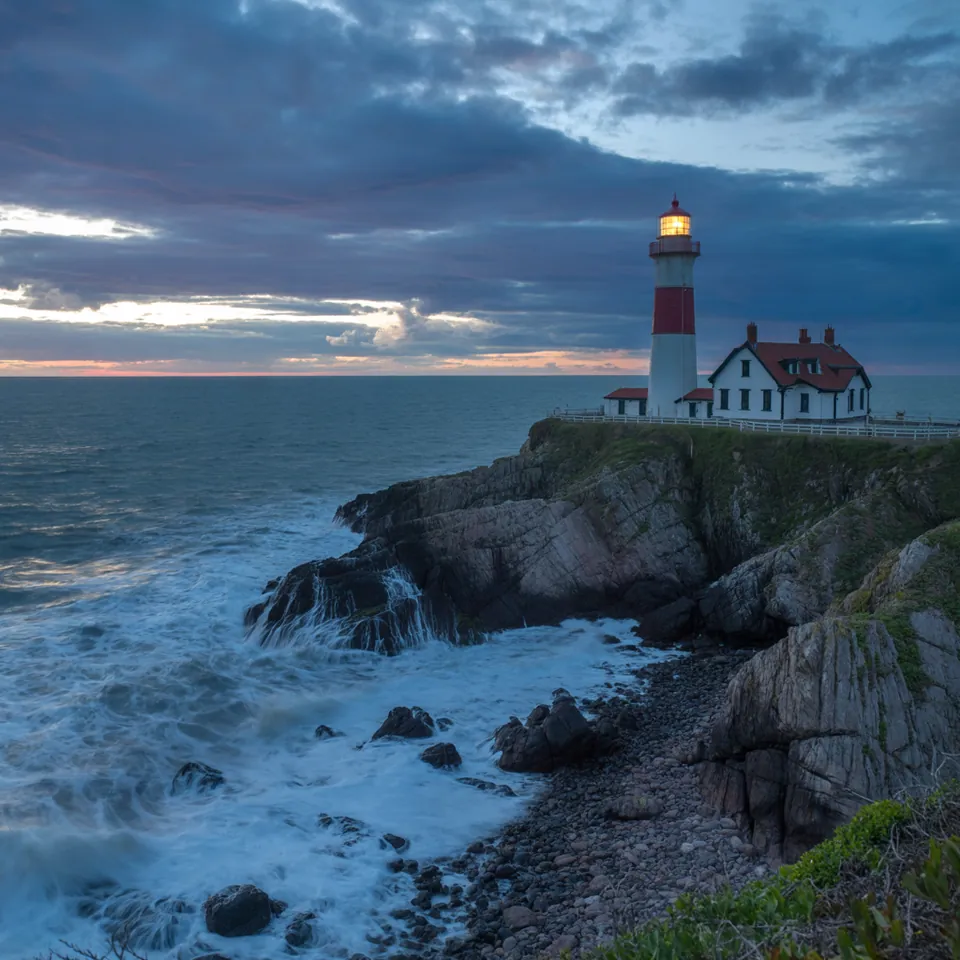
Drag the slider to compare. Left: TURBO (8.3 s). Right: QUALITY (13.3 s).
Model: Ideogram 3.0 (przez API fal.ai). Settings: seed 1411, prompt expansion turned off, only rendering_speed changes. Date: 14.11.2026.
Prompt: a lighthouse on a rocky coast at dusk, waves crashing, dramatic sky, wide shot, photo
I tested rendering_speed with seed 1411 and prompt expansion turned off. TURBO rendered a darker, noticeably simpler scene in 8.3 s. Switching to QUALITY increased the render time to 13.3 s, building crisper waves, sharper rock faces, and far more atmospheric detail across the sky. While the general composition remained similar, it was distinctly a different image: the speed setting alters the entire generative process rather than simply adding a final polish.
Syntax across generators
| Generator | Parameter | Values | Default |
|---|---|---|---|
| Midjourney* | --draft; Fast/Relax/Turbo GPU modesSprzeczność: tabela wersji oznacza Draft jako niedostępny w V8.1/V8.2, artykuł Draft opisuje działanie w V8.x | Draft V8.1/V8.2: 24 images 512x512, 0.4 GPU min, midjourney.com only (not Discord); V7: half the GPU cost | - |
| FLUX | grounding (FLUX 3)false = faster, prompt only (no web search) | true / false | true |
| Ideogram | rendering_speed (3.0, 4.0)In 4.5 use quality instead (very_low = fastest) | turbo, default, quality | default |
| GPT Image | model selection Flare (fast) vs Sunburst; quality; complexityComplex prompts up to 2 minutes | - | - |
| Qwen-Image | model selection (qwen-image-2.1-turbo) | - | - |
| Stability AI (SD 3.5) | model selection (sd3.5-large-turbo, sd3.5-flash) | - | - |
* Midjourney: docs.midjourney.com blocks automated scrapers, so values are sourced from search engine indexes. Please verify settings on the official Midjourney site before production use.
- Sources, verified on 14.11.2026:
- Midjourney: docs.midjourney.com/hc/en-us/articles/35577175650957-Draft-...
- FLUX: docs.bfl.ml/api-reference/utility/generate-an-image-with-fl...
- Ideogram: developer.ideogram.ai/openapi/ideogram-api-v2.json
- GPT Image: developers.openai.com/api/docs/guides/image-generation
- Qwen-Image: www.alibabacloud.com/help/en/model-studio/qwen-image-genera...
- Stability AI: docs.stability.ai/api-reference/generate/stable-diffusion-3...
When to use it
- Using turbo and draft settings to explore initial compositions or pitch rough concepts on a moodboard
- Switching to quality or standard mode for the final asset you plan to publish, print, or deliver to a client
- Selecting relax mode when you have time to wait and want to conserve your monthly high-speed compute allowance
Common mistake
A common mistake is locking down a prompt in turbo or draft mode, then switching straight to quality expecting the exact same image with crisper resolution. Speed settings alter the underlying sampling trajectory from the very first step. Even with an identical seed, changing the speed mode reshuffles details, lighting, and fine structure.
Ready-to-use example
Ideogram 3.0:  "rendering_speed": "turbo"
Ideogram 4.5:  "quality": "very_low"
Midjourney:  lighthouse at dusk --draft  or  --relax
GPT Image:  quality low as a cheaper sketch
Frequently asked questions
What is Draft mode in generative image tools?
Draft mode reduces generation steps or output fidelity to give you fast, low-cost sketches. It is designed for early brainstorming rather than production-ready artwork, though availability can vary across different platform tiers.
Does Relax mode in Midjourney reduce image quality?
No, Relax mode delivers the exact same visual quality as Fast mode. The only difference is queue priority: your prompt enters a dynamic, tiered waiting line instead of burning through your metered fast GPU hours.
Why does Turbo mode change my composition even when using the same seed?
Speed settings do not merely scale resolution at the end; they change the step count and mathematical path of the diffusion model. Because the generation path changes early on, the final layout, contrast, and element placement will drift.
When is it worth paying extra compute time for Quality mode?
Reserve quality modes for hero graphics, large web banners, physical print materials, and complex scenes with intricate lighting where high-frequency detail and sharp focus matter.