
Denoising Strength (Image Weight)
When you feed an existing photo into an image generator as a starting point, this parameter controls how far the model can wander from the original file. In Stable Diffusion and FLUX, higher denoising values instruct the system to overwrite the source with your prompt, whereas Midjourney reverses the logic with image weight, where higher values cling more faithfully to the uploaded reference.
Also known as: strength, denoise, denoising strength, image weight, --iw, image_prompt_strength
Side-by-side test results
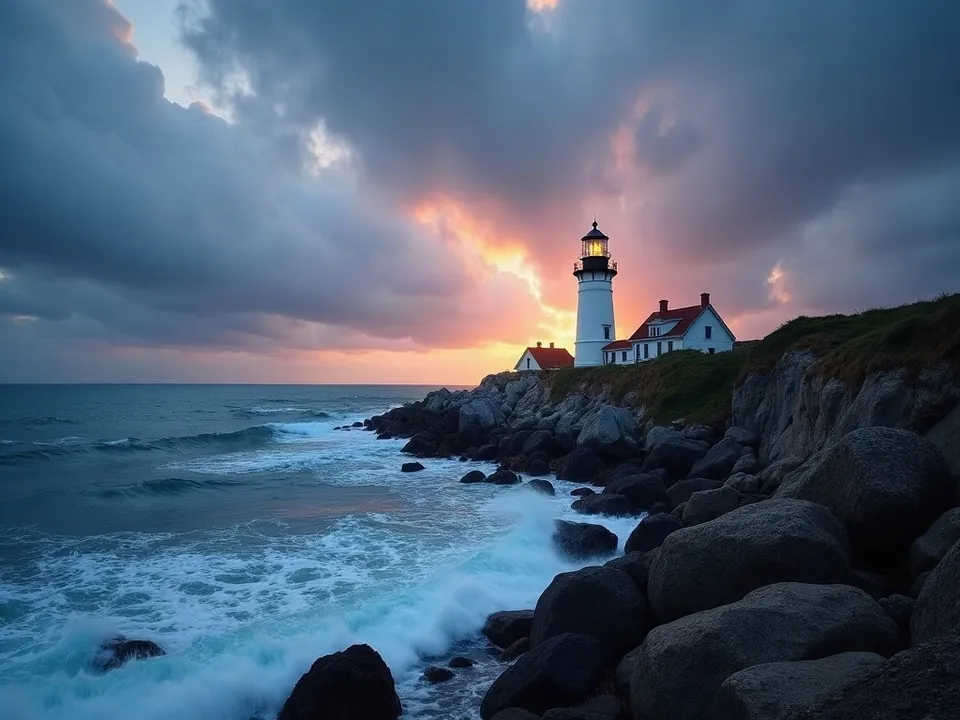
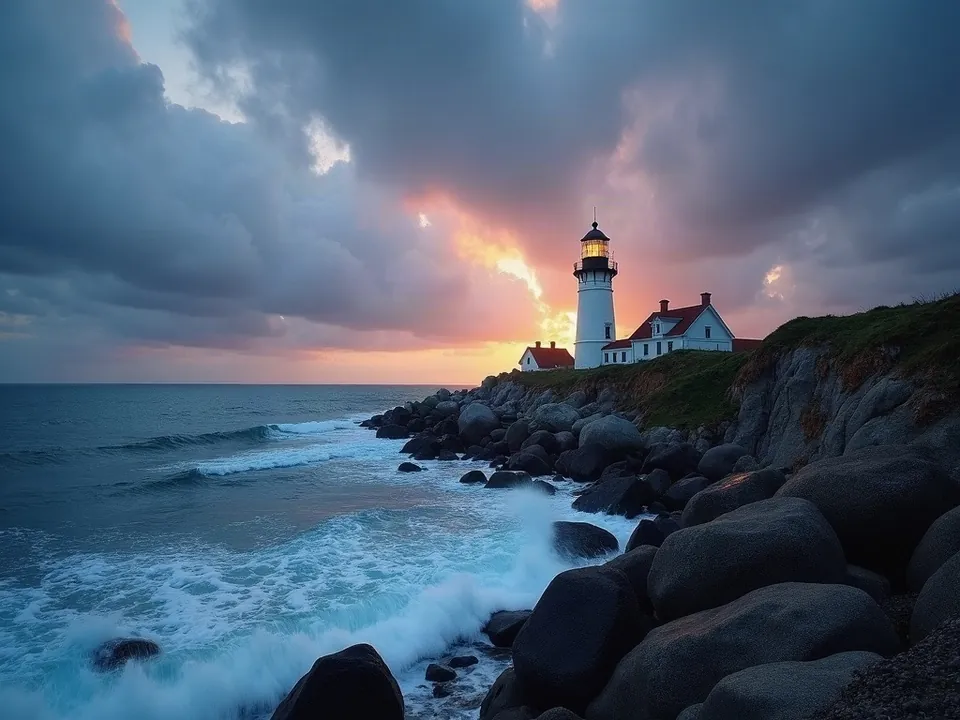
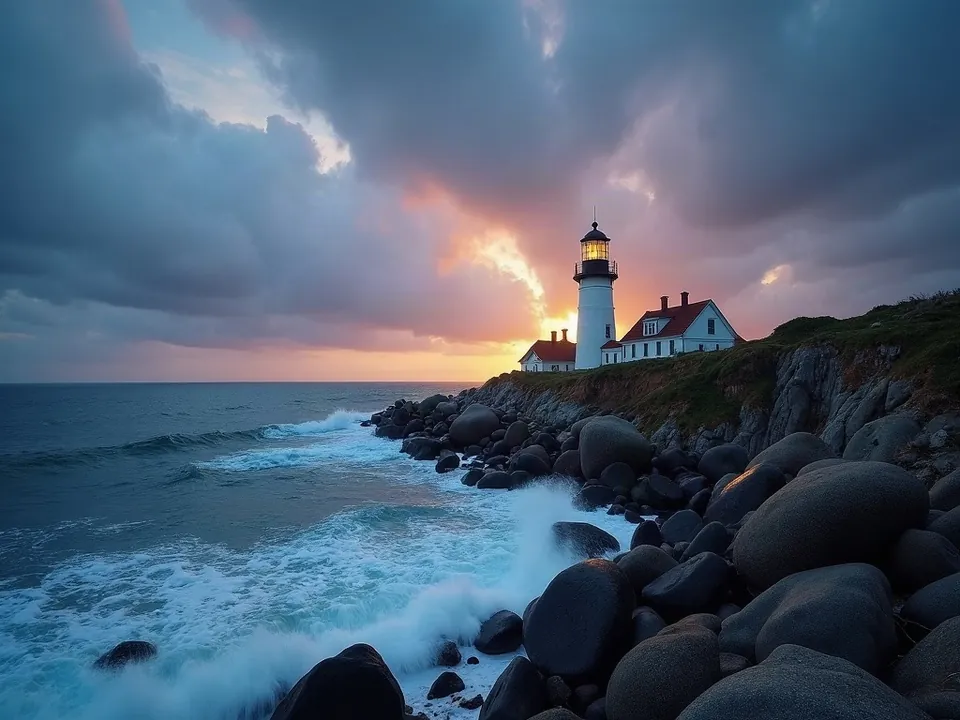
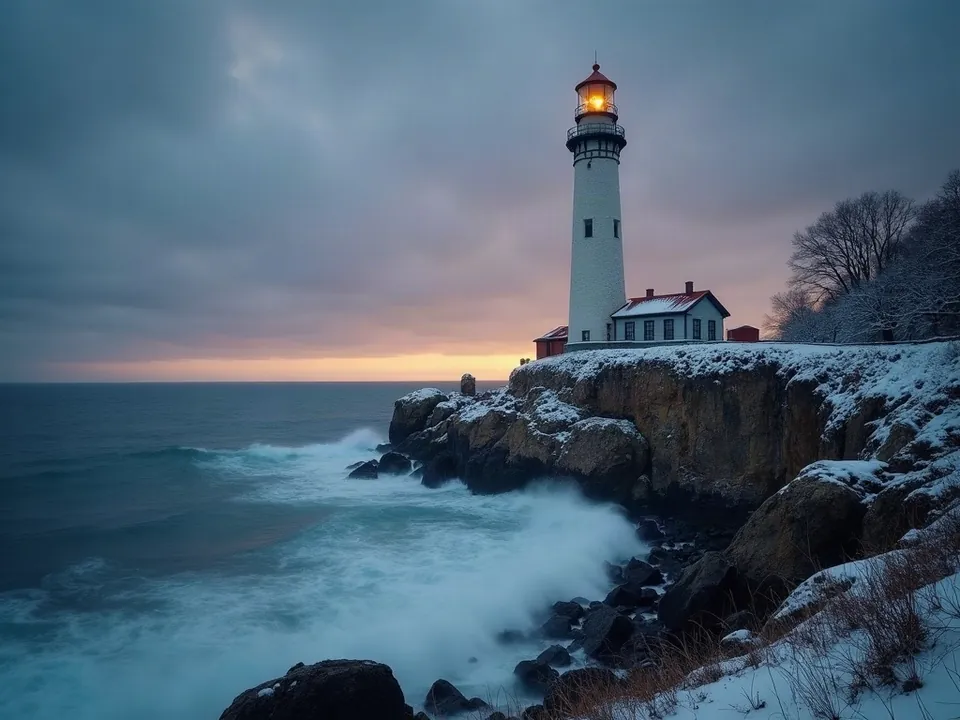
Model: FLUX.1 [dev] image-to-image (przez API fal.ai). Settings: Input image: lantern from the seed test, seed 1411, only strength varied.. Date: 14.11.2026.
Prompt: the same lighthouse in winter, heavy snow, overcast, photo
At 0.3 and 0.6, the generator held fast to almost the entire original photo: the snow requested in my prompt failed to appear. It took bumping the setting to 0.9 to actually rebuild the scene with thick snow and an overcast sky, though the lantern shifted position and warped in shape. There is no easy compromise here: the text prompt only overpowers the source image at high denoising levels.
Syntax across generators
| Generator | Parameter | Values | Default |
|---|---|---|---|
| Midjourney* | --iw | V8.1 and V7: 0-3; Niji 7: 0-2 (legacy: V6 0-3, V5/V4 0.5-2) | 1 |
| FLUX | image_prompt_strength (FLUX1.1 [pro] Ultra, with image_prompt)Blends prompt with image; image_prompt in base64 | 0-1 | 0.1 |
| Ideogram | image_weight (remix) - see waga-obrazu | 1-100 | selected by server |
| Ideogram | image_weight (remix)Remix Ideogram 3.0 and 4.0. Character Reference guide usually suggests 60-80 | 1-100 | none - when omitted, the server selects based on the prompt |
| Stability AI (SD 3.5) | strength (mode=image-to-image)0 = almost identical to input, 1 = as if without image. For sd3.5-flash best 0.94-0.97. Ultra: the same, image 64-16384 px | 0-1 | none (required with image) |
| Stability AI (SD 3.5) | see sila-img2img (strength) | - | - |
| ComfyUI | denoise (KSampler) | 0.0-1.0, step 0.01 | 1.0 |
| Midjourney | none (indirectly --iw) | - | - |
| FLUX | none (editing via instruction + reference images; Ultra: image_prompt_strength) | - | - |
| GPT Image | no such parameter | - | - |
| GPT Image | no such parameterinput_fidelity not configurable for gpt-image-2 (always high fidelity) | - | - |
* Midjourney: docs.midjourney.com blocks automated scrapers, so values are sourced from search engine indexes. Please verify settings on the official Midjourney site before production use.
- Sources, verified on 14.11.2026:
- Midjourney: docs.midjourney.com/hc/en-us/articles/32040250122381-Image-...
- FLUX: docs.bfl.ml/api-reference/models/generate-an-image-with-flu...
- Ideogram: developer.ideogram.ai/openapi/ideogram-api-v2.json
- Stability AI: docs.stability.ai/api-reference/generate/stable-diffusion-3...
- Stability AI: docs.stability.ai/api-reference/generate/stable-image-ultra.md
- ComfyUI: docs.comfy.org/built-in-nodes/sampling/ksampler
- FLUX: docs.bfl.ml/api-reference/utility/generate-an-image-with-fl...
- GPT Image: developers.openai.com/api/docs/guides/image-generation
When to use it
- 0.2 to 0.4 for subtle touch-ups: smoothing skin, adjusting daylight, or fixing small artifacts without altering composition.
- 0.5 to 0.7 for stylistic overhauls: turning a snapshot of a London pub into a watercolor painting while keeping the layout intact.
- 0.8 and higher when the original serves merely as a rough concept sketch: letting the model freely interpret basic silhouettes.
Common mistake
The most frequent trap is confusing the direction of the scale between platforms. In Stable Diffusion or FLUX, setting denoise to 0.9 creates an almost entirely brand-new picture, while setting --iw 2 in Midjourney binds the result tightly to the source picture. Another common error is asking for radical changes in your prompt while keeping strength down at 0.3, which leaves the original picture virtually untouched.
Ready-to-use example
ComfyUI:  KSampler -> denoise = 0.6 (with input image via VAE Encode)
Stability:  "strength": 0.6
FLUX1.1 [pro] Ultra:  "image_prompt_strength": 0.6
Midjourney:  <image-url> winter, snow --iw 1.5
Frequently asked questions
What does denoise mean in ComfyUI?
It dictates the amount of noise reintroduced to the latent representation of your source image. Setting it to 1.0 discards the original completely to create a fresh image, while lower decimals preserve structural detail.
What does --iw do in Midjourney?
It stands for image weight, setting how much importance Midjourney gives to your linked reference image compared to your text. A higher value keeps the output closer to the original artwork.
Why is the generator ignoring my prompt changes on an uploaded image?
Your denoising strength is set too low. If you ask for a sunny beach to become a blizzard at a strength of 0.3, the algorithm protects the original pixels and discards the new prompt instructions.
What is the best setting to change clothing without altering a face?
For targeted edits without masking, values between 0.35 and 0.45 offer the best compromise. Anything above 0.5 typically begins to warp facial proportions and expressions.