
CFG Scale (Guidance Scale)
CFG, short for Classifier-Free Guidance, controls how strictly an image generator follows your text prompt. Lower values give the model room to improvise, often yielding softer, more natural compositions, while higher values force strict obedience at the expense of overcooked colors and waxy textures.
Also known as: CFG scale, guidance, guidance_scale, cfg_scale
Side-by-side test results
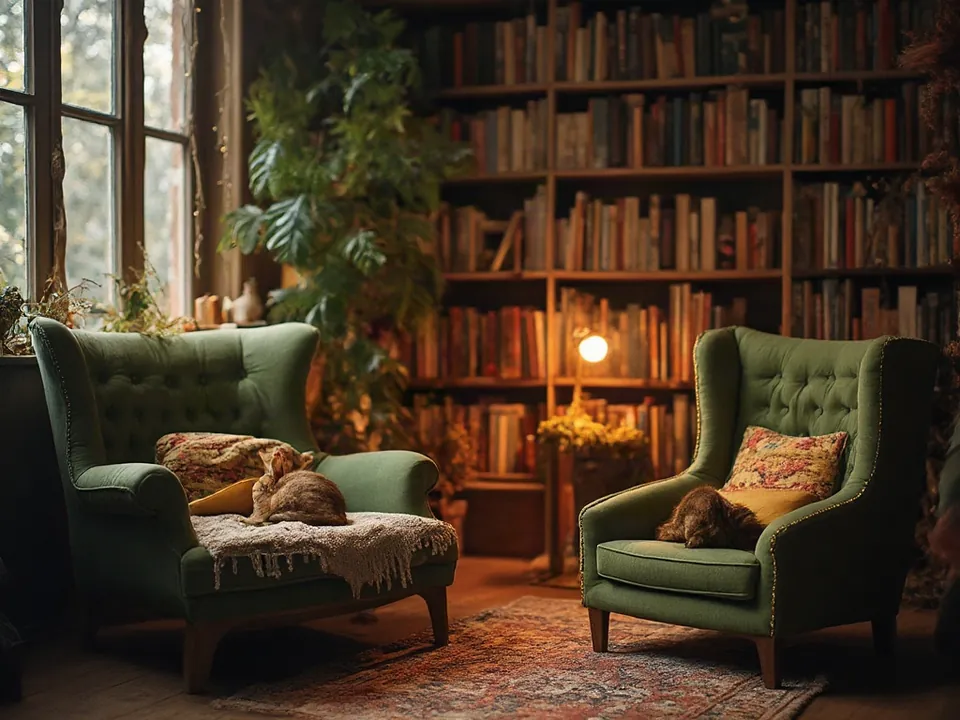
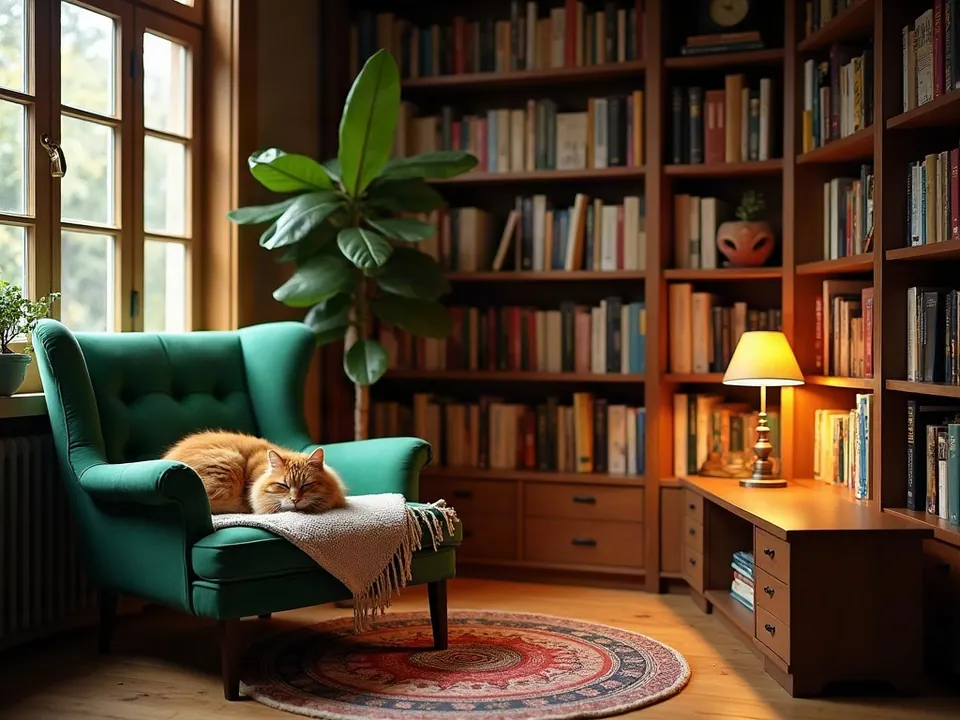
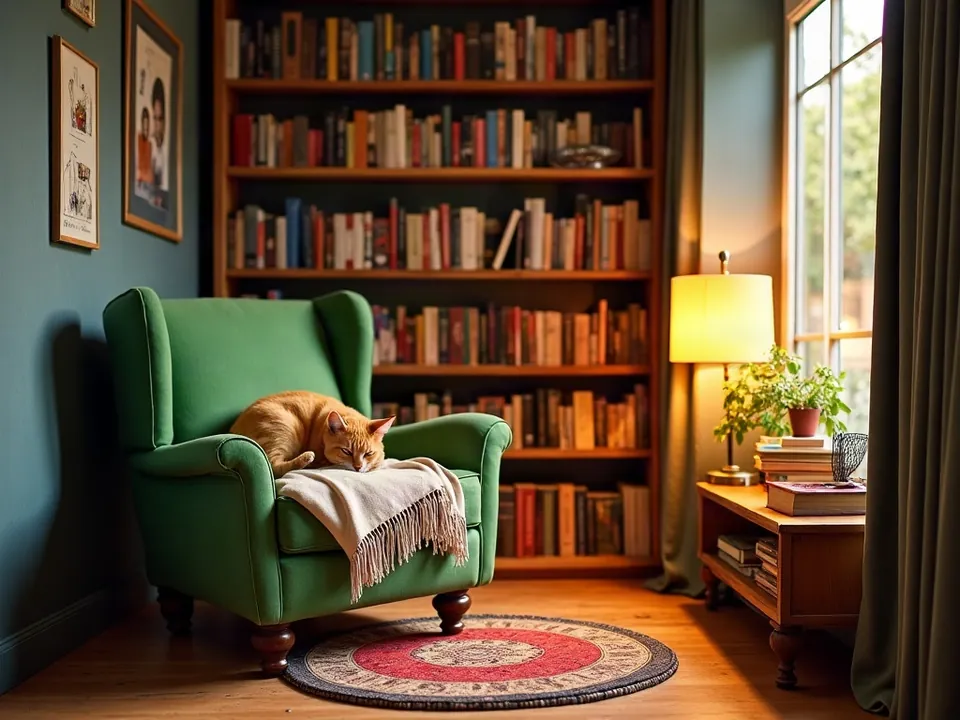
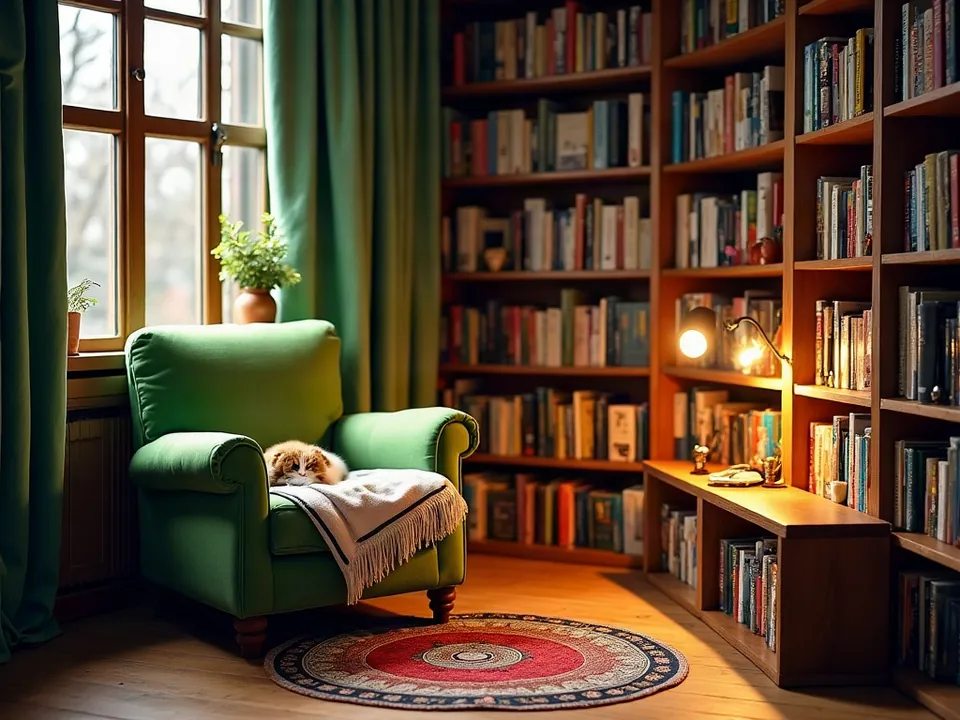
Model: FLUX.1 [dev] (otwarte wagi, przez API fal.ai). Settings: seed 1411, 28 steps, guidance value changed only. Date: 14.11.2026.
Prompt: a cozy reading nook with a green armchair, tall bookshelves and a cat sleeping on a blanket, warm lamp light, photo
At 1.5, the model drew two armchairs inside a soft, hazy room, treating my prompt quite loosely. Dialling it up to 3.5 delivered exactly what I asked for: one armchair, a cat, and a lamp. Raising it to 7 and 15 steadily amplified contrast and saturation, until at 15 the result looked like an oversaturated, harsh catalogue advert.
Syntax across generators
| Generator | Parameter | Values | Default |
|---|---|---|---|
| FLUX | guidanceHigher = better prompt adherence, less realism. Missing in FLUX 3 Image and FLUX.2 [pro]. Klein: Distilled CFG 1, Base CFG 3.5 | FLUX.2 [flex]: 1.5-10; Fill/Expand: 1.5-100 | FLUX.2 [flex]: 5; Fill/Expand: 60 |
| Seedream | guidance_scale - unconfirmedNot found in content for 5.0/4.x | - | - |
| Stability AI (SD 3.5) | cfg_scaleSD 3.5 endpoint only | 1-10 | sd3.5-large/medium: 4; turbo/flash: 1 |
| ComfyUI | cfg (KSampler) | 0.0-100.0, step 0.1 | 8.0 |
| Midjourney | no such parameter | - | - |
| Ideogram | no such parameter | - | - |
| GPT Image | no such parameter | - | - |
| Imagen (retired) | none in retrieved documentation | - | - |
| Qwen-Image | none in retrieved documentation | - | - |
- Sources, verified on 14.11.2026:
- FLUX: docs.bfl.ml/api-reference/models/generate-or-edit-an-image-...
- Seedream: docs.byteplus.com/en/docs/ModelArk/1541523
- Stability AI: docs.stability.ai/api-reference/generate/stable-diffusion-3...
- ComfyUI: docs.comfy.org/built-in-nodes/sampling/ksampler
- Midjourney: docs.midjourney.com/hc/en-us/articles/32859204029709-Parame...
- Ideogram: developer.ideogram.ai/openapi/ideogram-api-v2.json
- GPT Image: developers.openai.com/api/docs/guides/image-generation
- Imagen: docs.cloud.google.com/vertex-ai/generative-ai/docs/image/ge...
- Qwen-Image: www.alibabacloud.com/help/en/model-studio/qwen-image-genera...
When to use it
- Raise it when the model misses specific subjects or details mentioned in your description.
- Lower it when skin looks like plastic, lighting feels aggressive, or colors appear burnt out.
- Keep the default value until you spot a clear problem with prompt adherence or image quality.
Common mistake
Carrying over guidance numbers between different generators. A value that produces clean results in standard open-source tools can easily fry an image in newer distilled models. Every architecture calibrates guidance differently, so stick to the recommended baseline and adjust in small increments.
Ready-to-use example
ComfyUI:  KSampler -> cfg = 7.0
Stability API:  "cfg_scale": 4
FLUX API:  "guidance": 5
Midjourney, ChatGPT, Ideogram:  no parameter - manage adherence through prompt phrasing
Frequently asked questions
What CFG scale should I start with?
Always start with your tool's default setting. Make minor adjustments of 0.5 to 1.0 in either direction, watching closely for color burn or missing elements.
Does Midjourney have a CFG parameter?
No, Midjourney does not offer a direct CFG control. The closest alternative is the stylize parameter, though it works in reverse by boosting artistic flair over literal prompt adherence.
Why do high CFG settings make pictures look fake?
Pushing guidance too high forces the model to amplify every single prompt token, which clips highlights, crushes shadows, and leaves subjects with an unnatural, plasticky sheen.