PS5 Capture Card - Ranking and Prices: Elgato 4K S, 4K X, AVerMedia
Ranking of PS5 capture cards: Elgato 4K S, 4K X, AVerMedia. Check prices and features for smoother gameplay.

Indhold 10
- Why a capture card when the game has 30 fps
- Ranking of cards for console and frame generation
- What to look for when choosing
- Cheap grabbers for approx. 84 PLN - what to watch out for
- Key setting: 60 fps capture and duplicates
- What is the total cost
- What the card cannot change
- My test - coming soon
- Frequently Asked Questions
- Ofte stillede spørgsmål
Prices are from Polish retailers and the currency conversion is approximate: 100 PLN ≈ 167.76 DKK based on the National Bank of Poland rate from 2026-11-20. NBP
- The Elgato 4K S is the best choice for PS5, offering 4K60 passthrough and 1080p/1440p capture at 60 fps via USB.
- More expensive models like the Elgato 4K X and AVerMedia GC553G2 with HDMI 2.1 offer more future-proofing but are not essential for GTA 6 at 30 fps.
- A capture card does not add frames; it transfers the image to a computer where software generates additional frames for smoother visuals on faster monitors.
Status as of 19.11: Prices from Ceneo, checked on 19.11.2026. Retailers change them daily - check the current price before buying. Full series on fluid image: GTA 6 60 fps - all methods.
For gaming with frame generation, the Elgato 4K S (from 820.66 PLN) is the most sensible choice today: it has passthrough up to 4K60 and captures 1080p and 1440p at 60 fps via USB. More expensive Elgato 4K X and AVerMedia GC553G2 have HDMI 2.1 and more future-proofing, but for GTA 6 at 30 fps, they offer nothing that the 4K S wouldn't. The cheapest grabbers for approx. 84 PLN are not recommended for this purpose.
Why a capture card when the game has 30 fps
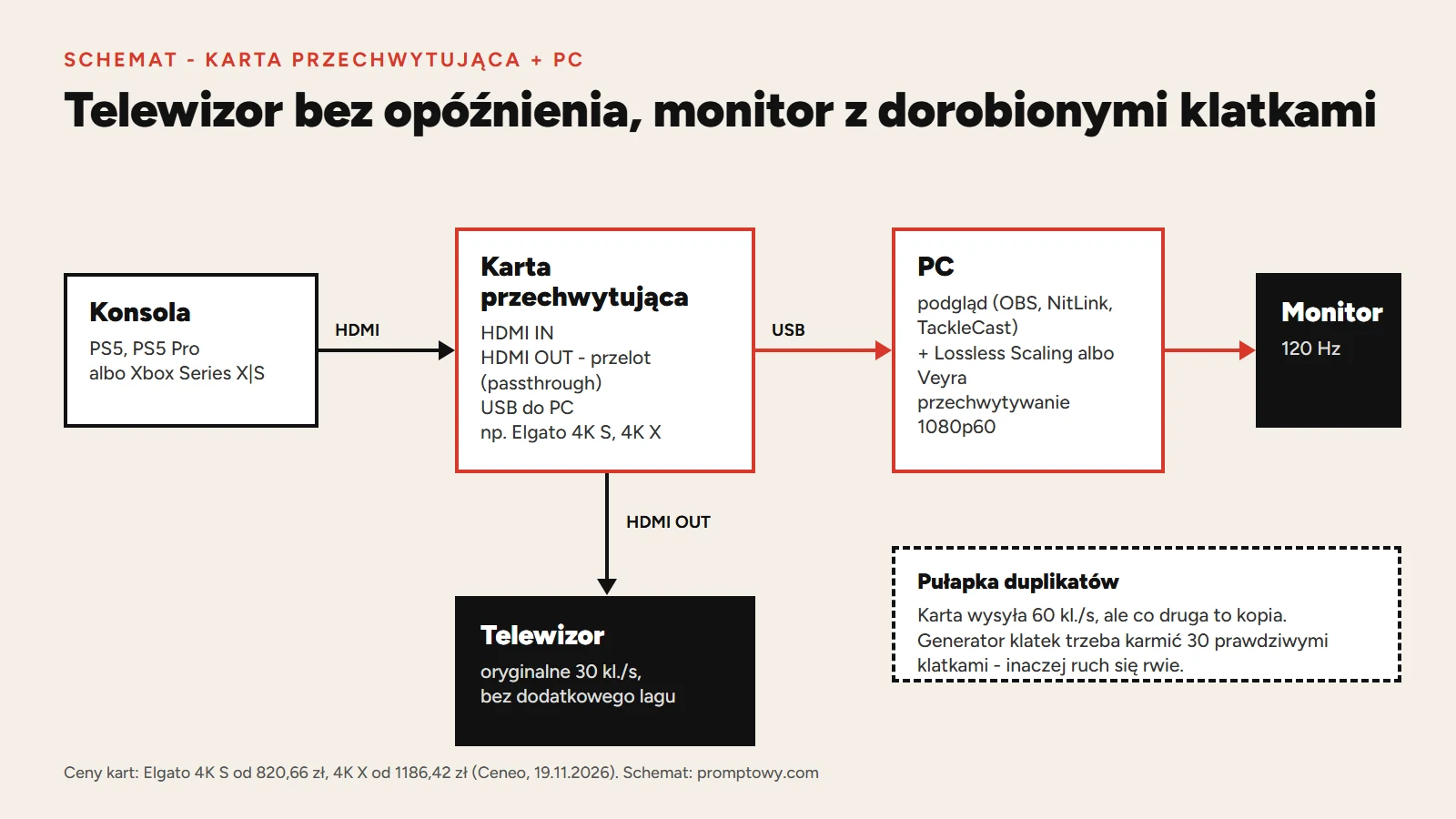
The card does not add frames. It transfers the image from the console to the computer, and only there does a frame generation program (Lossless Scaling, Veyra, NitLink, SmoovPlay) insert intermediate frames and display the result on a 60 Hz or faster screen. Compared to Remote Play over the network, the card provides an image without stream compression and without Wi-Fi dependency - hence some players choose this path despite the cost.
Ranking of cards for console and frame generation
| Card | Price from | Passthrough | Capture | For whom |
|---|---|---|---|---|
| 1. Elgato 4K S | 820.66 PLN | up to 2160p60, 1440p120, 1080p240, VRR | 2160p60, 1440p60, 1080p120, 1080p60; HDR10 up to 1080p60 (Windows) | best price-performance ratio, USB 3.0 Type-C |
| 2. Elgato 4K X | 1186.42 PLN | HDMI 2.1, up to 4K144 | up to 4K144 (without HDR), HDR up to 1440p60 | those who also want to record and stream at high frame rates; USB-C 3.2 Gen 2 |
| 3. AVerMedia Live Gamer Ultra 2.1 (GC553G2) | 1047.42 PLN | HDMI 2.1 | according to the manufacturer - check modes before buying | alternative to 4K X |
| 4. Elgato 4K Pro | 1223.85 PLN | - | - | PCIe card for desktop, not for laptop |
| Elgato HD60 X | discontinued | up to 4K60, 1440p120, 1080p240 | 4K only 30 fps, 1080p60 HDR | if you have it - it's enough; don't look for a new one, its successor is 4K S |
| Ugreen CM489 Grabber | 83.90 PLN | check the specifications | check the specifications | more for testing than for gaming |
Prices: Ceneo, checked on 19.11.2026. Parameters: manufacturer's pages Elgato 4K S and Elgato 4K X. In the US, the 4K S costs $159.99, the 4K X costs $249.99.
What to look for when choosing
- Passthrough. HDMI output to the TV. Thanks to it, you can play on the TV without delay in recording, and have the image with frame generation on the screen next to it - or switch as needed. For 30 fps, 4K60 passthrough is sufficient.
- Capture 1080p60 or 1440p60. This is the minimum. The console sends a 60 Hz signal even when the game runs at 30 fps - the card must receive it fully. 4K60 capture is useful for recordings, and for frame generation, a higher resolution is a greater load on the graphics card.
- USB 3.0 or faster. The Elgato 4K S and 4K X cards connect via USB-C. Connect them to a USB 3.x port on the back of the computer, not to a hub.
- HDCP. If the card shows a black screen with PS5, check the HDCP option in the console's settings (Settings - System - HDMI). HDCP protection blocks recording in video apps, among others.
- Own preview program. The preview window in OBS or in the manufacturer's application adds delay. The Lossless Scaling community uses lightweight previews: TackleCast adds 5-10 ms according to GameGPU. Veyra and NitLink have their own preview from the card.
Cheap grabbers for approx. 84 PLN - what to watch out for
The cheapest HDMI-USB grabbers, like the Ugreen CM489 (from 83.90 PLN), have "4K 60Hz" in their name, but this is usually a parameter for input, not for capture. Before buying, check three things in the specifications: whether there is a passthrough output, at what resolution and with how many frames the device actually captures, and whether it sends the image via USB 3.0. If the manufacturer does not specify 1080p60 capture, it is useless for frame generation.
Key setting: 60 fps capture and duplicates
GTA 6 runs at 30 frames per second, but the console sends a 60 Hz signal - every other frame is a repeat of the previous one. This leads to two rules:
- Capture in 60 fps. TweakTown warns, while describing Veyra, that direct capture at 30 fps results in approximately twice the capture delay.
- The generation program must know the real frame count. If Lossless Scaling receives a 60 Hz image where every other frame is a copy, the timing will be off. Players on the Steam forum recommend setting the preview to send real 30 fps, or using a program that removes duplicates itself (Veyra does this). Details: Lossless Scaling with console - step-by-step settings.
What is the total cost
| Item | Cost |
|---|---|
| Elgato 4K S card | from 820.66 PLN (Ceneo, 19.11.2026) |
| Lossless Scaling (Steam) | 27.00 PLN |
| or NitLink (Steam) | 23.99 PLN (21.59 PLN on sale until 22.11) |
| or Veyra, SmoovPlay | 0 PLN, open source software |
| Computer with graphics card | Lossless Scaling recommends RTX 30 / RX 6000 / Arc; NVIDIA generation in Veyra requires RTX 40 or 50 |
Without a card, you can try for free via Remote Play: Xbox Series X and Xbox app or PS5 and chiaki-ng. Programs for the card are described in the text Veyra, NitLink and SmoovPlay.
What the card cannot change
The game still reacts as if at 30 fps - the controller is read at the same rate, and frame generation adds its own delay. The image becomes smoother, but the controls do not become faster. Milliseconds according to available measurements: frame generation delay.
My test - coming soon
I am testing GTA 6 on Xbox Series X with a computer equipped with an RTX 4090 and Lossless Scaling - first via Remote Play, then via a capture card. I will add measured results here: delay, artifacts, and whether the difference in fluidity is worth the money.
Frequently Asked Questions
Which capture card for PS5 and Xbox up to 60 fps?
Elgato 4K S (from 820.66 PLN) - captures 1080p and 1440p at 60 fps and has passthrough up to 4K60. More expensive cards with HDMI 2.1 are primarily useful for recording at high frame rates.
Is Elgato HD60 X sufficient?
Yes, if you already have it - it captures 1080p60. The manufacturer has discontinued it, and its successor is the 4K S.
Does a capture card increase fps in the game?
No. It sends the image to the computer, where a frame generation program first adds intermediate frames. The console still calculates 30 fps.
Why does PS5 show a black screen via the card?
The most common reason is HDCP protection. Check the HDCP setting in PS5 settings (System - HDMI) and the cable connected to the card's input, not passthrough.
Is a cheap grabber for 84 PLN sufficient?
Only if the manufacturer specifies 1080p60 capture via USB 3.0. "4K 60Hz" in the name usually means input only.
All methods for a smoother image compiled: GTA 6 60 fps. Everything about the game: GTA 6 hub.
Ofte stillede spørgsmål
What is the best PS5 capture card for frame generation?
For gaming with frame generation, the Elgato 4K S (from 820.66 PLN) is the most sensible choice today. It offers 4K60 passthrough and captures 1080p and 1440p at 60 fps via USB. It provides the best value for money.
Does a capture card add frames to PS5 gameplay?
No, a capture card does not add frames. It transfers the image from the console to the computer, where frame generation software (e.g., Lossless Scaling) inserts intermediate frames and displays the result on a 60 Hz or faster monitor.
Kommentarer 0
Kommentarer med bandeord, fornærmelser eller beskyldninger mod personer eller virksomheder gennemgås manuelt før offentliggørelse. Spam slettes.
Ingen kommentarer endnu. Skriv den første.
