Kapwing subtitles: fix caption timing and choose the right export
Yes. Open the subtitles, edit the text and adjust its timing before you export.
Contents 4
In Kapwing, start in the Subtitles panel. The choice that matters comes at the end: do you need a finished video with captions visibly embedded, or a separate subtitle track that a viewer can turn off? I decide that before designing the text.
- Yes. Open the subtitles, edit the text and adjust its timing before you export.
- An SRT carries text and timing. For a fixed visual style, inspect the exported captioned video.
Fix the transcript before styling it
- Upload the clip or open your project. Generate subtitles from the spoken language, type them manually or import an existing subtitle file.
- Listen to the first line and one line near the end. Fix names and numbers, then move the start or end of any caption that appears during the wrong sentence.
- Watch once with the sound muted. If a sentence changes before you can finish reading it, split the text at a natural pause and check the new timing.
- For a captioned social video, export the video and play the downloaded file. For a selectable track, check the subtitle-file export available on your plan and upload that file alongside the video.
Why the downloaded SRT looks plain
An SRT describes the sequence of captions, their timestamps and the words. The player controls how a separate track is displayed. For a campaign that requires specific brand lettering, inspect the video export rather than judging the design in a text editor.
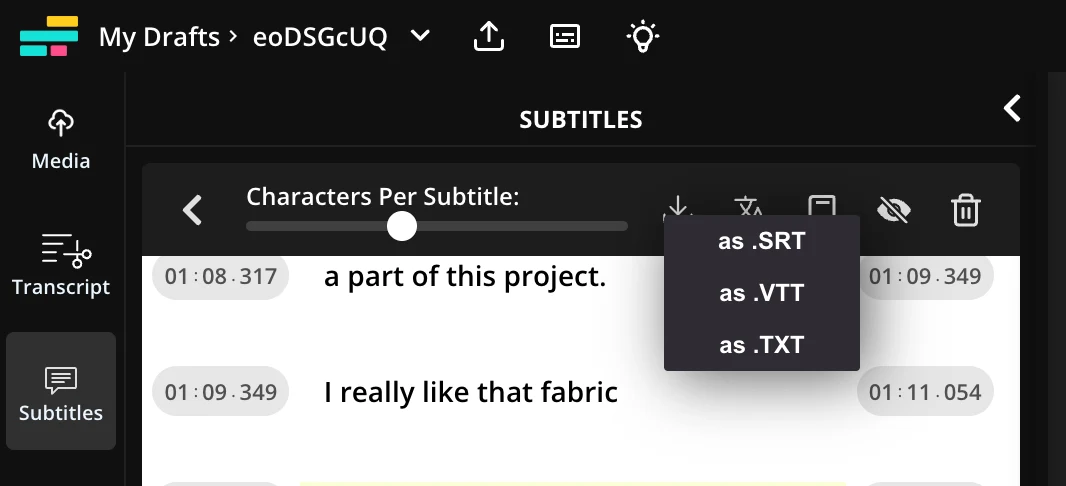
If subtitles appear twice after upload, check whether the video already contains burned-in captions and whether the platform is displaying a second subtitle track.
Find more practical guides in the English edition of Promptowy.
Related guide · calculate an image’s aspect ratio.
Sources
Frequently asked questions
Can I correct an automatically generated caption?
Yes. Open the subtitles, edit the text and adjust its timing before you export.
Will an SRT preserve my Kapwing font and background design?
An SRT carries text and timing. For a fixed visual style, inspect the exported captioned video.
