Hostinger webmail login: find the inbox behind your business address
Identify the mail service behind a business address, open the correct inbox and check what happened to older messages after a hosting move.

Contents 4
If an old browser bookmark still opens your business inbox, keep it until you know which service it uses. For Hostinger Mail, open mail.hostinger.com and enter the entire mailbox address and its password. For Titan Email purchased through Hostinger, the service opens at hostinger.titan.email. Both can use an address that looks like sales at your own domain.
- The product label identifies which webmail page to use.
- Check both new delivery and the old archive before cancelling a previous service.
Read the product name before resetting a password
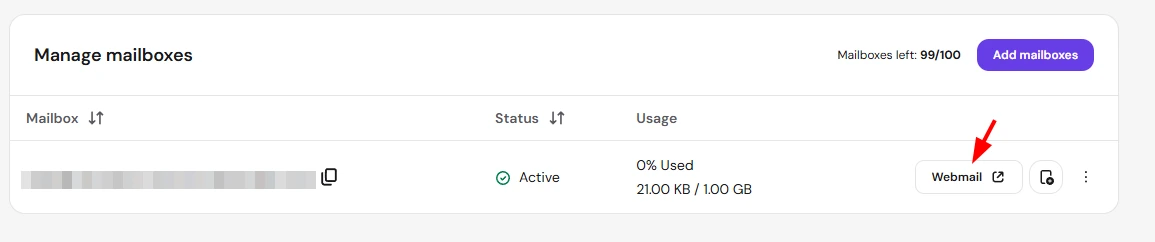
The domain owner can open Emails in the Hostinger dashboard and select the service next to the domain. In the mailbox list, choose Webmail beside the exact address you need. If last year’s receipt mentions a different host, check whether the company moved only its website. A Bluehost webmail bookmark, for instance, can still lead to the old mailbox after a website move.

I would leave the working phone profile alone while testing. Open a private browser window and type the mailbox address so autofill cannot supply the owner’s hosting password. A fresh session is also useful on a shared laptop: opening Webmail from the dashboard can resume an existing session.
The inbox is open but last quarter is missing
Send a message from an unrelated account and reply to it. Then look for an older message you can identify by subject in a specific folder. If new mail works but the older message is absent, check how the archive was moved. The MX records that direct new mail do not copy the old inbox.
Hostinger’s import tool needs access to the source mailbox over IMAP. A source server that exposes only the inbox cannot supply the Sent folder through that connection. Before cancelling an old hosting plan, compare a known sent message, a custom folder and an attachment at the destination. That test catches a partial migration that a single successful login will miss.
Sources
- Hostinger United States
- Hostinger Help Center: Hostinger Webmail, Titan Email and importing messages over IMAP.
- Bluehost Help: accessing cPanel, WHM or webmail.
Frequently asked questions
Does the Hostinger account password open my mailbox?
Use the mailbox password with the full email address. The hosting account has separate credentials.
Where do I read Titan Email from Hostinger?
Use hostinger.titan.email or open the Titan service from the Emails section in the hosting dashboard.
