Hostinger login: get back into the dashboard when the reset email never arrives
Find the account that owns your hosting, recover a social sign-in, and tell a missing reset email apart from a lost second factor.
Contents 5
To open the Hostinger dashboard, use the Log in button on the Hostinger homepage or enter auth.hostinger.com in your browser. If you need an invoice or a domain renewal, this is the right place. The useful clue when a reset email never arrives is how the account was created. An email address ending in Gmail can belong to either a password-based Hostinger account or a Google sign-in.
- The hosting dashboard opens through auth.hostinger.com.
- The original sign-in method determines which recovery flow works.

Match the sign-in method before requesting another email
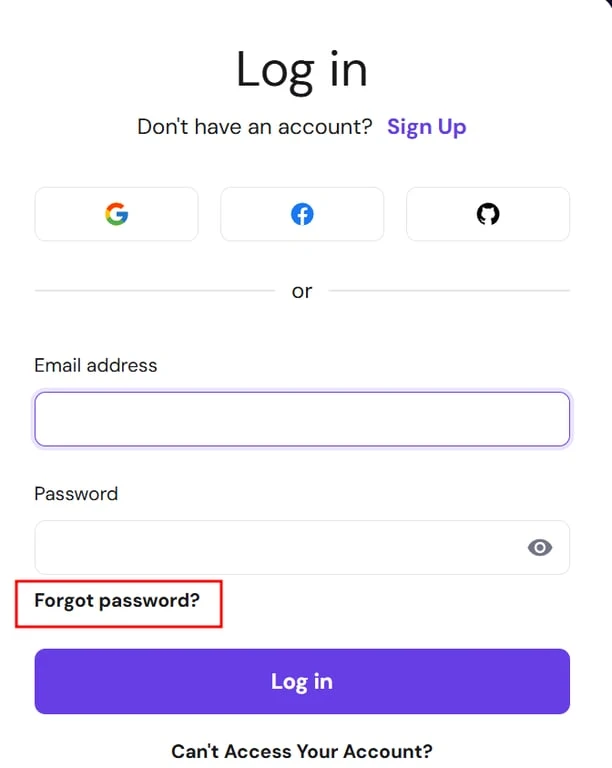
If you set a password with Hostinger, request a reset for the address used at signup. Check spam and any filtered inbox categories. If several reset messages arrive, use the latest one. If you chose Continue with Google when you signed up, use the same Google account again. Hostinger’s password-reset form does not send reset mail for a social sign-in. Recovery starts with the sign-in provider.
When the person who built the site has left
I would start with a renewal receipt and confirm which service it names. A company can have a Bluehost account for an older site, a Hostinger account for a new site, and a separate provider for email. Bluehost also separates its account portal from individual webmail and hosting access. A saved cPanel password from the old site tells you little about who owns the new hosting contract.
If the Hostinger account belongs to your business but the signup inbox or two-factor device is gone, use the official account recovery flow. Prepare a reachable address and proof of ownership, such as a payment receipt. Submit those details in the provider’s recovery process. A contractor who only needs site access does not need a copy of the owner’s credentials.
Put the right bookmark back
After access is restored, check the domain or plan shown in the dashboard and add a recovery address you can reach independently of the hosted site. If your only task was to read customer messages, open mail.hostinger.com and use the mailbox credentials instead. That distinction matters the next time someone in the office asks for “the hosting password.”
Sources
- Hostinger United States
- Hostinger Help Center: dashboard access, account password reset and account recovery.
- Bluehost Help: cPanel access through the Bluehost Portal.
Frequently asked questions
Why is there no Hostinger reset email for my Google sign-in?
Accounts created with a social sign-in use that provider’s credentials. Use the same Google account or recover access with Google.
What if I lost the inbox or phone used for verification?
Use Hostinger account recovery with a reachable alternative email and documentation confirming ownership.
